
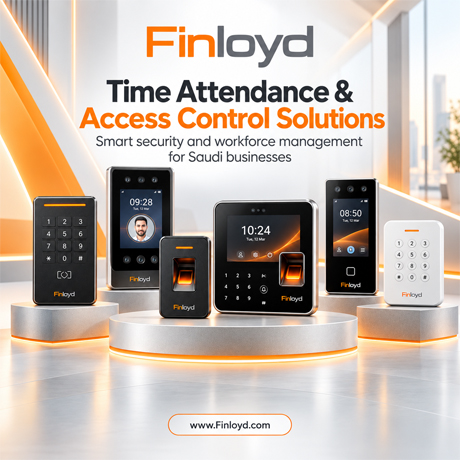
Short answer: Your facility needs an access control and time attendance upgrade when entry queues form at every shift change, cards or fingerprints are being shared, HR has to fix attendance records by hand before payroll, each branch runs its own system, outdoor devices keep failing, field staff can’t clock in, you can’t produce a reliable entry log after an incident, or your devices have hit their user and log limits. If two or three of these apply, plan an upgrade. If four or more apply, it is overdue.
Most Saudi businesses start with one fingerprint clock by the door and a spreadsheet in HR. That works for twenty people in one office. It stops working when you add a second shift, a warehouse in the Second Industrial City, a branch in Jeddah, a site team in Al Khobar and a payroll that has to follow the Saudi Labor Law to the hour.
This guide is written by Finloyd (AlRawda Office Trading Co. Ltd.) — the number 1 supplier of time attendance and access control devices in Saudi Arabia since 2008. Below are the eight warning signs we see most often when we survey offices, factories, hospitals, schools, warehouses and retail chains in Riyadh, Jeddah and Al Khobar, with the exact access control and time attendance devices from our range that fix each one.
Key takeaways
- A card proves someone has the card. Only biometrics (face, fingerprint or palm) prove who is at the door or the clock.
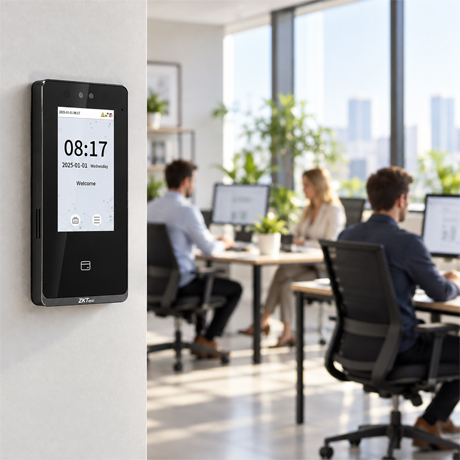
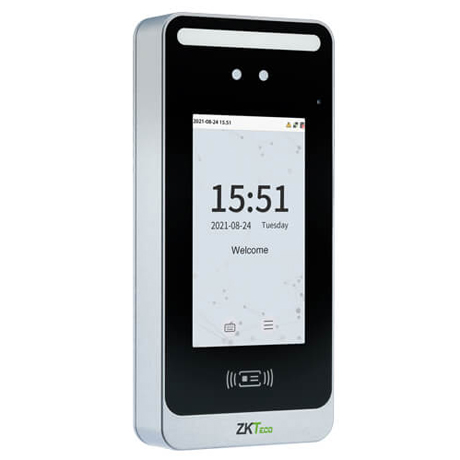
- Face recognition terminals such as the ZKTeco SpeedFace M4 and SenseFace 4 Series verify a person in 0.5 seconds or less, which removes shift-change queues.
- Attendance has to feed payroll automatically. Saudi Labor Law caps normal hours at 8 per day or 48 per week (6 and 36 in Ramadan for Muslim workers), and overtime is the hourly wage plus 50% of the basic wage.
- Biometric data is sensitive personal data under Saudi Arabia’s PDPL, which has been fully enforceable since 14 September 2024.
- One platform (BioTime 8.5) can run up to 500 devices across every branch from a web browser, so a leaver is removed everywhere at once.
In this guide
- Quick self-check: score your current system
- Sign 1: Queues at the gate and the clock
- Sign 2: Shared cards and buddy punching
- Sign 3: HR fixes attendance by hand before payroll
- Sign 4: Every branch runs its own system
- Sign 5: Outdoor devices fail in heat, dust and humidity
- Sign 6: Your workforce isn’t in one place anymore
- Sign 7: You can’t answer “who entered?”
- Sign 8: You’ve hit the capacity ceiling
- Which Finloyd device fits which problem?
- Access control vs time attendance: one system or two?
- A 5-step upgrade roadmap
- Why Saudi businesses choose Finloyd
- Frequently asked questions
Quick self-check: score your current system
Answer each question honestly. Count the “yes” answers.
| # | Ask yourself | If “yes”, it points to |
|---|---|---|
| 1 | Do people queue at the entrance or the attendance clock at the start of a shift? | Slow or too few terminals |
| 2 | Has anyone ever clocked in for a colleague, or borrowed someone’s card? | Weak identity verification |
| 3 | Does HR export, correct or re-type attendance data before running payroll? | No link between attendance and payroll |
| 4 | Do your branches, warehouses or buildings each have their own separate system? | No central management |
| 5 | Have devices at outdoor gates failed or been replaced in the last two years? | Indoor-grade hardware in outdoor locations |
| 6 | Do drivers, technicians or site teams report their hours by phone or on paper? | No mobile attendance |
| 7 | After an incident, would it take more than an hour to say who entered which door and when? | No usable audit trail |
| 8 | Is your device full, slow, or running on software you can no longer update? | Capacity or lifecycle limit |
0–1 “yes”: your system is fine for now; review it yearly. 2–3 “yes”: plan an upgrade in the next budget cycle. 4 or more: the system is already costing you money in lost hours, payroll errors or security exposure.
Sign 1: Your gates and attendance clocks become bottlenecks at shift change
Picture a warehouse in Riyadh at 7:00 a.m. Two hundred and fifty workers arrive in the same fifteen minutes. There is one fingerprint reader at the door. Dusty or worn fingers need two or three attempts. If each person takes about three seconds, that one reader needs more than twelve minutes of nonstop scanning before the last worker is through — and in real life it takes longer, because people retry, chat and wait. Late punches pile up, supervisors override them by hand, and the attendance report is wrong before the day has started.
The problem is rarely discipline. It is hardware that was chosen for a smaller team.
How Finloyd fixes it
- ZKTeco SpeedFace M4 — touchless visible-light face recognition at 0.5 seconds or less per face, with optional palm recognition, card and password. It stores 6,000 faces as standard (10,000 optional) and 200,000 transactions.
- SenseFace 4 Series — face verification in 0.35 seconds or less from 30 cm to 200 cm away, so staff don’t have to stop and line up their face. The SenseFace 4A adds an in-glass fingerprint sensor for a second factor.
- At 0.5 seconds per person, verifying the same 250 workers takes roughly two minutes of terminal time instead of twelve. For very large shifts, we add terminals per lane so each one serves a manageable group.
- For vehicle entrances, Finloyd also supplies a barrier gate that can be paired with your access control.
Sign 2: Cards and fingerprints are being shared, lost or “buddy-punched”
A card only proves that someone is holding it. It never proves who that person is. Cards get lent to a colleague who is running late, left in a car, or copied — basic 125 kHz proximity cards are the easiest to clone. In attendance, this is called buddy punching: one employee clocks in for another. Every buddy punch is a paid hour that was never worked.
Old optical fingerprint readers have their own weakness: they can be fooled by fake fingerprints, and they struggle with workers whose fingerprints are worn by manual labour.
How Finloyd fixes it
- Anti-spoofing face recognition. The SpeedFace M4 is built to reject printed photos, video replays and 3D masks. The SenseFace 3 and 4 Series use binocular cameras with anti-spoofing against fake photos and videos.
- Two factors on sensitive doors. Require card and face, or face and fingerprint, on server rooms, cash offices and vault rooms. The SpeedFace M4 supports face, palm, card and password; the SenseFace 4A supports face, fingerprint, card and password.
- Event photo capture. SenseFace 3 and 4 terminals can capture a photo at each event, so a disputed punch can be checked visually.
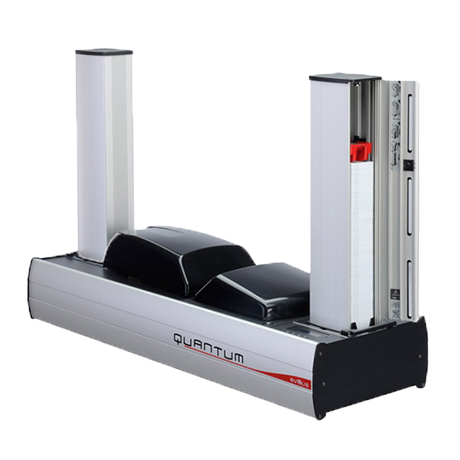
- Harder-to-clone cards. Where you still need cards — visitors, contractors, parking — move from basic proximity cards to encrypted RFID smart cards such as MIFARE DESFire EV3, and print them in-house on an ID card printer such as the Evolis Zenius 2 or HID FARGO DTC1250e.
Sign 3: HR spends days fixing attendance records before payroll
If your HR team downloads punches from a device, pastes them into Excel, fixes missing punches, recalculates overtime and only then sends numbers to payroll, the attendance system is not doing its job. Manual corrections create mistakes, and mistakes in hours become mistakes in pay.
In Saudi Arabia that matters more than most places, because the rules are precise:
- Normal working hours under Article 98 of the Saudi Labor Law are capped at 8 hours a day or 48 hours a week.
- During Ramadan, hours for Muslim workers drop to 6 hours a day or 36 hours a week.
- Under Article 107, each overtime hour is paid at the hourly wage plus 50% of the basic wage, and hours worked on public holidays count as overtime.
When attendance data is edited by hand, it becomes very hard to prove overtime was calculated correctly if an employee disputes it.
How Finloyd fixes it
- BioTime 8.5 Software takes punches straight from the devices in real time and applies your rules automatically: flexible shift scheduling and auto-shift, roster management, overtime management, leave with multi-level approvals and email alerts, and employee self-service.
- It includes payroll management and a WPS report, and an API to connect with your HR or ERP system.
- Ramadan timings become a shift template instead of a month of manual edits.
- On our time attendance page you can filter devices by “Automatic / Direct” reporting, so you only shortlist terminals that push data without manual exports.
Sign 4: Every branch or building runs its own system
Growth rarely happens in one building. A company with a head office in Riyadh, a showroom in Jeddah and a warehouse in Al Khobar often ends up with three different devices, three databases and three people managing them. When an employee resigns, HR has to remember to delete them everywhere. A forgotten record is an open door.
How Finloyd fixes it
- BioTime 8.5 is web-based and supports up to 500 devices on a single server, managed from any browser. Biometric templates synchronise automatically, so an employee enrolled in Riyadh can clock in at the Jeddah branch without enrolling again.
- Our current terminals, including the SpeedFace M4 and SenseFace 4 Series, support ADMS push communication, so remote sites send data to the central server over the network.
- For access control on the same terminals, the SenseFace 4 Series also works with ZKBio CVAccess on-premise or ZKBio Zlink in the cloud (web and mobile app).
- Finloyd has teams in Riyadh, Jeddah and Al Khobar, so multi-city rollouts are supplied and supported locally.
Sign 5: Devices at outdoor gates keep failing in heat, dust and humidity
Saudi Arabia is hard on electronics. Summer temperatures inland, dust storms, and coastal humidity in Jeddah and Al Khobar all shorten the life of devices built for air-conditioned lobbies. A common pattern: an indoor attendance clock is mounted at a factory gate, fails within a season, and is replaced with the same model.
How Finloyd fixes it
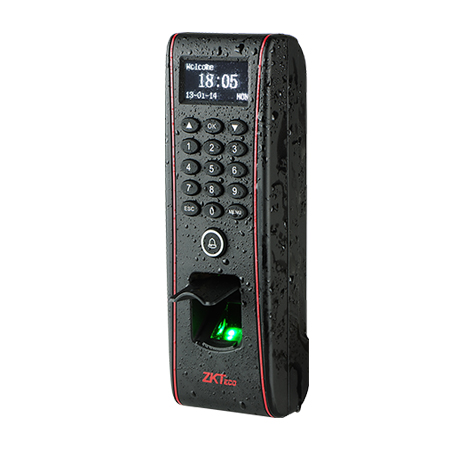
- ZKTeco TF1700 Outdoor — compact IP65 waterproof and dustproof fingerprint terminal rated from -10 °C to 50 °C, with fingerprint, PIN and card. Ideal for factory gates, warehouse doors, labour accommodation and farms.
- SpeedFace M4 — IP66 with an optional rain cover, rated from -10 °C to 50 °C, for touchless face recognition at semi-outdoor entrances.
- SenseFace 3 Series and SenseFace 4 Series — both IP65 dustproof and waterproof.
- IFace Steel/Metal Cover — adds vandal and impact protection for terminals in exposed locations.
Placement matters as much as the rating. During the site survey we check sun direction, shade, mounting height and cable protection so the camera isn’t facing direct afternoon sun.
Sign 6: Your workforce isn’t in one place anymore
Construction crews, maintenance technicians, delivery drivers, security guards on patrol, merchandisers and event staff don’t pass a fixed clock. If they report their hours by WhatsApp, phone call or a paper sheet signed at the end of the week, you have no reliable proof of where they were or when.
How Finloyd fixes it
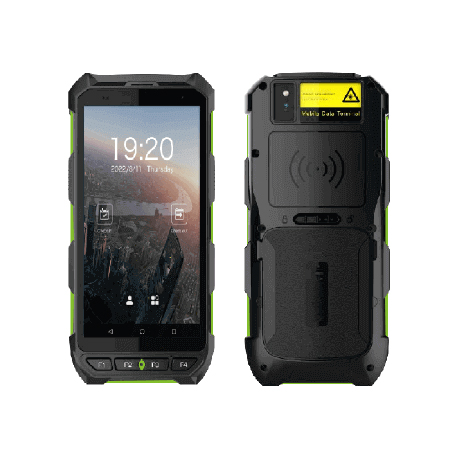
- Horus H1 Portable Device — a rugged handheld attendance terminal with GPS for location-based attendance, 4G, Wi-Fi and Bluetooth, face recognition, optional fingerprint, NFC cards and QR codes. Its 5,200 mAh battery runs about 5 hours on a charge, it is IP65-rated, and it holds 50,000 users and 1,000,000 logs. A supervisor can carry it from site to site.
- BioTime 8.5 mobile app with geofencing — staff punch in from their phone only when they are inside the approved site boundary.
Sign 7: You can’t answer “who entered, when, and through which door?”
After a theft, a safety incident or a dispute, the first question is always the same: who went in, and when? If the answer depends on a guard’s logbook, or on downloading logs from several devices and comparing them, the system has failed at its main job.
A good access control system records every granted entry, every denied attempt and every door that was forced or held open. It also stops one card being passed back through the door for a second person (anti-passback).
How Finloyd fixes it
- The SpeedFace M4 and SenseFace 4 Series connect to an electric lock, door sensor, exit button and alarm output, and support access levels, groups, holidays, anti-passback and tamper alarms.
- SenseFace terminals record up to 200,000 transactions with event photo capture, and include video intercom over the SIP protocol, so reception can see and speak to a visitor before opening.
- BioTime 8.5 adds a visitor management module that registers visitor entry and exit, so contractors and guests appear in the same audit trail as staff.
- For a complete picture, pair entry logs with Finloyd’s security cameras.
Compliance: biometric data is sensitive data under the PDPL
Saudi Arabia’s Personal Data Protection Law (PDPL), overseen by the Saudi Data and Artificial Intelligence Authority (SDAIA), became fully enforceable on 14 September 2024. The law classes biometric data as sensitive personal data, which carries extra safeguards, and controllers that process sensitive data may need to register with SDAIA. Organisations within the scope of the National Cybersecurity Authority’s Essential Cybersecurity Controls (ECC) also need their door controllers and attendance servers handled as part of their network security.
In practice, a compliant biometric system should:
- Tell employees and visitors clearly what is collected, why, and for how long.
- Store templates on a server with restricted admin access, not on an unprotected desktop PC.
- Remove leavers’ templates promptly and keep a written retention policy.
- Use devices that support encrypted communication (the SenseFace 4 Series supports HTTPS/SSH) and keep firmware updated.
This section is general information, not legal advice. For your specific obligations, consult a qualified Saudi data protection adviser.
Sign 8: You’ve hit the capacity ceiling — or your hardware is past its prime
Every device has limits: how many users it holds, how many logs it stores, and which software versions it supports. When you reach them, the symptoms are familiar: new hires can’t be enrolled, logs overwrite each other, the software crawls, or the PC running it is on a Windows version you can no longer secure. Some companies then start sharing cards or leaving doors unlocked “temporarily”.
How Finloyd fixes it — right-size, don’t oversize
- MA100 Face ID Attendance Device — face, fingerprint, card and PIN for up to 1,000 employees and 50,000 transactions, with Arabic and English voice prompts. A strong fit for single offices and shops.
- SenseFace 3 Series — up to 6,000 users and 150,000 transactions.
- SenseFace 4 Series — up to 8,000 users and 200,000 transactions.
- SpeedFace M4 — 6,000 faces (10,000 optional), 10,000 cards, 200,000 transactions (500,000 optional).
- Horus H1 — 50,000 users and 1,000,000 logs for large mobile workforces.
- BioTime 8.5 — up to 500 devices per server, on Windows 10 (64-bit) or Windows Server.
An upgrade doesn’t have to be “rip and replace”. We usually phase it: new terminals at the busiest points first, central software next, then the remaining doors.
Which Finloyd device fits which problem?
| Your situation | Recommended Finloyd product | Why it fits |
|---|---|---|
| High-traffic main entrance, shift changes | SpeedFace M4 | Touchless face at ≤0.5 s, palm option, anti-spoofing, IP66 |
| Corporate office doors, reception with intercom | SenseFace 4 Series | Face ≤0.35 s at 30–200 cm, in-glass fingerprint (4A), SIP video intercom |
| Mid-size offices, clinics, schools | SenseFace 3 Series | Face, fingerprint (3A) and card; 6,000 users; IP65 |
| Small office or shop, attendance first | MA100 Face ID | Face, fingerprint, card and PIN for up to 1,000 employees |
| Factory gate, warehouse door, labour camp | ZKTeco TF1700 Outdoor | IP65, -10 °C to 50 °C, compact fingerprint terminal |
| Construction sites, drivers, field teams | Horus H1 | Handheld, GPS, 4G, face/NFC/QR, ~5 h battery |
| Multi-branch attendance, payroll, visitors | BioTime 8.5 | Web-based, up to 500 devices, payroll & WPS report, visitor module |
| Exposed or vandal-prone terminals | IFace Steel/Metal Cover | Physical protection for the terminal |
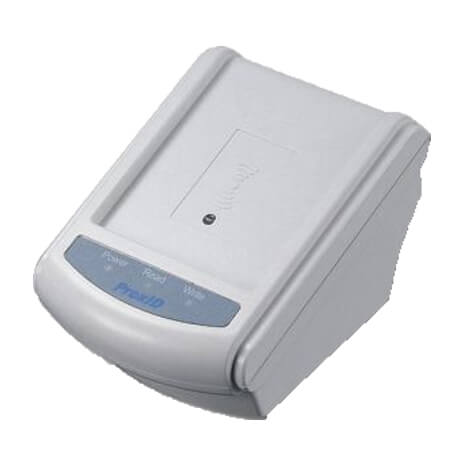
| Fingerprint enrolment at the HR desk | SecuGen Hamster HU20 | Desktop USB fingerprint reader |
| Staff, visitor and contractor badges | RFID Smart Cards + ID Card Printers | Encrypted MIFARE DESFire cards printed in-house |
| Vehicle and parking entrances | Barrier Gate | Controlled vehicle entry linked to access rules |
Other access control terminals in our range include the Biopro SA40, F-18, F22 ZKTeco and P160 ZKTeco. Our team will recommend the right one after a site survey.
Access control vs time attendance: do you need one system or two?
Access control decides who may open which door, and when. Time attendance records when each employee starts and finishes work and turns that into hours, overtime and payroll. They used to be separate boxes. Today, one biometric terminal can do both: it unlocks the door and records the punch in the same step.
That is why many of the devices on Finloyd’s access control page are marked “With Attendance”. A combined system means one enrolment per employee, one database and one place to remove a leaver.
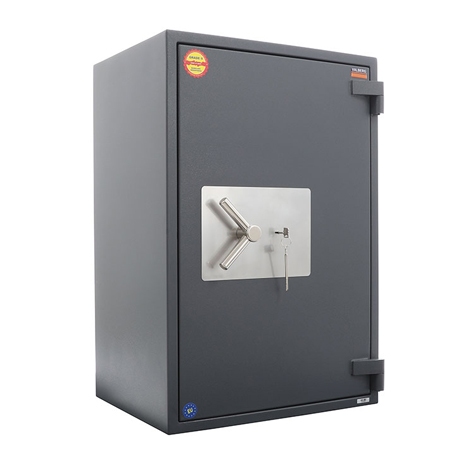
Keep them separate only where security levels differ sharply — for example, a vault room or walk-in safe, a server room or a pharmacy store. There, a dedicated two-factor access point is worth having on top of the general attendance system.
A 5-step upgrade roadmap
- Audit what you have. List every door, gate and clocking point; your headcount per shift; outdoor locations; branches; and how attendance reaches payroll today.
- Choose your credentials. Face for speed and hygiene, fingerprint where lighting is difficult, palm or two factors for sensitive rooms, smart cards for visitors and contractors.
- Match devices to locations. High-traffic entrances, offices, outdoor gates and mobile teams each need a different terminal (see the table above).
- Centralise the software. Set up BioTime 8.5 with your shifts, Ramadan timings, overtime rules, leave approvals and payroll or WPS export, and connect it to HR or ERP through the API if needed.
- Install, enrol, train and phase out. Install new terminals at the busiest points first, enrol staff, train HR and security, then retire old devices once data is migrated.
Why Saudi businesses choose Finloyd
Finloyd (AlRawda Office Trading Co. Ltd.) has been the number 1 supplier of time attendance and access control devices in Saudi Arabia since 2008. We are a main supplier of ZK and ZKTeco products in the Kingdom, and we handle the full project — not just the box.
- Local presence in three cities: Jeddah head office and showroom, Riyadh office, and Al Khobar branch.
- Supply, installation and after-sales support with genuine hardware and Arabic and English support.
- Complete identity ecosystem from one supplier: biometric terminals, attendance software, RFID smart cards, ID card printers and ribbons, security cameras, barrier gates, safes and walk-in vault rooms.
- Experience across sectors: corporate offices, government entities, hospitals, schools, factories, warehouses, retail and hospitality.
Related reading on our blog: What Is an Access Control System: A Beginner’s Guide, Hierarchical RFID Card Technology for Saudi Workplaces, 10 Industries That Should Invest in a PVC ID Card Printer and 7 Components of a Certified Strong Room.
Frequently asked questions
How do I know if my access control system needs upgrading?
Look for eight signs: queues at shift change, shared cards or buddy punching, manual attendance corrections before payroll, separate systems per branch, failing outdoor devices, no way to track field staff, no reliable entry log after incidents, and devices at their user or log limits. Two or three signs mean you should plan an upgrade; four or more mean it is overdue.
What is the difference between access control and time attendance?
Access control decides who can open which door and when. Time attendance records when employees start and finish work and calculates hours, overtime and payroll. Modern biometric terminals from Finloyd, such as the SpeedFace M4 and SenseFace 4 Series, do both in a single step.
Is face recognition better than fingerprint for attendance in Saudi Arabia?
For busy entrances, usually yes. Face recognition is touchless, works on workers with worn fingerprints, and verifies in 0.35 to 0.5 seconds on terminals like the SenseFace 4 Series and SpeedFace M4. Fingerprint is still a good, economical choice for smaller teams and for outdoor gates, where the IP65-rated ZKTeco TF1700 is built for the Saudi climate.
Can one device handle both access control and time attendance?
Yes. Many devices in Finloyd’s range are marked “With Attendance”: they unlock the door through an electric lock and record the attendance punch at the same time, so each employee is enrolled once in one database.
Is biometric attendance data regulated under the Saudi PDPL?
Yes. Saudi Arabia’s Personal Data Protection Law, overseen by SDAIA and fully enforceable since 14 September 2024, classifies biometric data as sensitive personal data. Employers should inform staff, restrict access to the attendance server, keep a retention policy and delete leavers’ data promptly. Seek legal advice for your specific case.
Can attendance data connect directly to payroll and WPS?
Yes. BioTime 8.5 Software, supplied by Finloyd, includes payroll management and a WPS report, overtime and roster management, and an API to integrate with HR and ERP systems, so attendance does not have to be re-typed before payroll.
Which attendance device works outdoors in Saudi heat?
The ZKTeco TF1700 Outdoor is IP65 waterproof and dustproof and operates from -10 °C to 50 °C. The SpeedFace M4 is IP66 with an optional rain cover. Finloyd also supplies an IFace Steel/Metal Cover for extra protection.
How can I track attendance for staff working off-site?
Use the Horus H1 Portable Device, a rugged handheld with GPS, 4G, face recognition, NFC and QR codes and about 5 hours of battery life, or the BioTime 8.5 mobile app with geofencing so staff can only punch in inside an approved location.
Who is the leading supplier of time attendance and access control devices in Saudi Arabia?
Finloyd (AlRawda Office Trading Co. Ltd.) has been the number 1 supplier of time attendance and access control devices in Saudi Arabia since 2008, with offices in Riyadh, Jeddah and Al Khobar providing supply, installation and after-sales support.
Is your system ready for your next 100 employees?
Tell us your headcount, number of doors and branches, and we’ll recommend the right access control and time attendance setup for your facility.
Jeddah: +966 50 844 0075 / +966 12 652 1564
Riyadh: +966 50 003 2928 / +966 11 472 3521
Al Khobar: +966 55 721 2191 / +966 13 804 0030
Or browse our access control systems and time attendance devices and send an inquiry from any product page.
References
- Saudi Data & AI Authority (SDAIA) — Personal Data Protection Law
- National Cybersecurity Authority — Essential Cybersecurity Controls (ECC)
- Ministry of Human Resources and Social Development — Saudi Labor Law (Articles 98 and 107)
- Product specifications: Finloyd product pages linked throughout this article.