
Every time an Evolis ID card printer produces a card, it runs the same precise, repeatable sequence: it feeds a blank card, cleans it, encodes any chip or magnetic data, prints the artwork with a thermal head and ribbon, seals it under a protective overlay, and ejects a finished credential — often in well under a minute. Understanding that cycle is the difference between buying the right printer, ribbon, and security level the first time, and paying for reprints, downtime, and cards that fade in the Saudi heat.
Finloyd (Alrawda Office Trading Co. Ltd) has been the No. 1 name in ID card printer sales and distribution in Saudi Arabia since 2008 — more than 17 years supplying, installing, and supporting genuine Evolis solutions for government, corporate, healthcare, education, and industrial clients across Riyadh, Jeddah, and Al Khobar. This guide walks through what actually happens inside an Evolis printer on every print cycle, and how each stage protects your organisation.
The demand behind that decision is real. The global ID card printer market was valued at roughly USD 1.73 billion in 2025 and is forecast to reach about USD 2.50 billion by 2032, and analysts single out Saudi Arabia specifically — where giga-project construction and national ID modernisation under Vision 2030 are driving bulk procurement of high-volume, dual-sided printers.
The Evolis print cycle, step by step
A modern Evolis printer is not a single “print” action — it is a short assembly line of quality and security checks. Here is the full cycle for a standard direct-to-card model:
- Card feeding and alignment. Blank PVC (or PVC-composite) cards sit in the input feeder. A roller separates and pulls in exactly one card, and an internal sensor confirms a single card is correctly positioned before anything is printed.
- Card cleaning. The card passes an adhesive cleaning roller that lifts dust, fibres, and micro-debris off the surface. Skipping this stage is the single most common cause of white specks and print defects — which is why Evolis builds it into every cycle.
- Encoding (optional). If the printer is fitted with an encoder, data is written to the card’s magnetic stripe, contact chip, or contactless RFID chip, then read back and verified. On many workflows this happens before printing so a failed encode never wastes a printed card.
- Colour printing. The thermal print head presses against the ribbon and the card. Heating elements transfer each colour layer in sequence to build the photo, logo, and background (explained in detail below).
- Black and resin printing. A separate black resin panel lays down sharp text, barcodes, and serial numbers with the crisp edges scanners need.
- Protective overlay (and optional lamination). A clear overlay or varnish panel seals the surface against abrasion and UV. For high-security or long-life cards, a separate lamination module can bond a thicker patch — with or without a hologram — for tamper resistance.
- Ejection. The finished card drops into the output hopper, ready to issue. On enterprise models this repeats continuously for hundreds of cards per hour.
How does an Evolis printer actually put the image on the card?
The “printing” stage above hides the real engineering. Evolis printers use different core technologies depending on the model and the level of quality and security you need.
Direct-to-card (DTC) printing
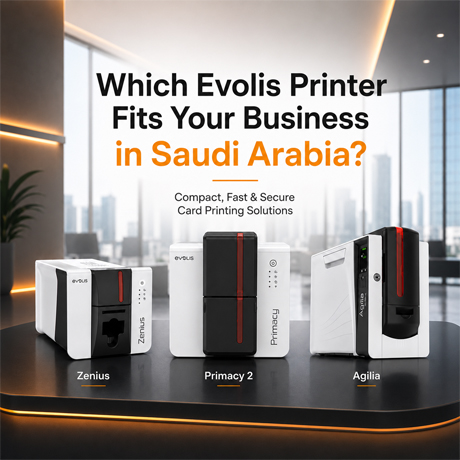
DTC is the most common method and powers models like the Evolis Zenius 2 and Evolis Primacy 2. The print head applies the ribbon directly onto the card surface. It is fast, cost-effective, and ideal for employee badges, membership cards, and access cards — the everyday workhorse of most Saudi organisations.
Dye sublimation and the YMCKO ribbon
Colour images are produced by dye sublimation. The print head heats microscopic elements that turn solid dye on the ribbon into gas, which diffuses into the card and re-solidifies. Because the head controls temperature across 256 levels per colour, gradients are smooth and photos look continuous rather than dotted. The standard colour ribbon is called YMCKO: Yellow, Magenta, and Cyan panels combine to reproduce millions of colours, K is a black resin panel for text and barcodes, and O is the clear overlay that protects the finished card.
Resin thermal transfer
For elements that must be perfectly sharp and durable — black text, 1D/2D barcodes, and serial numbers — Evolis uses resin thermal transfer. Instead of diffusing into the card, solid resin bonds to the surface, giving high contrast and machine-readable reliability that scanners and access readers depend on.
Retransfer (high-definition) printing
Premium security cards use retransfer, the technology inside the Evolis Agilia. Here the image is printed in reverse onto the underside of a clear film first, then thermally fused onto the card. The result is true edge-to-edge, “over-the-edge” printing at 600 dpi, with the ink protected beneath the film. Retransfer also prints cleanly on uneven surfaces such as contactless smart cards, and it is the go-to for government IDs and high-security credentials. Evolis has positioned the Agilia as the successor to its earlier Avansia retransfer line.
How Evolis encodes smart, contactless, and magnetic cards
A credential is often more than a printed picture — it is the key that opens a door or logs an attendance record. Evolis printers can be fitted with encoders that write and verify data during the same cycle, so a single pass produces both the visual ID and the working access card:
- Magnetic stripe encoding for legacy access, loyalty, and payment-style cards.
- Contact chip encoding for smart cards that insert into a reader.
- Contactless / RFID (MIFARE, DESFire, and similar) encoding for tap-to-enter access control and cashless applications.
This is why an Evolis printer sits at the centre of an identity and access ecosystem rather than being a standalone office device.
The security layers Evolis adds to every card
Each printer strengthens a credential in different ways. The features you choose should map to how sensitive the facility or data is:
- Protective overlays and lamination resist scratching, chemicals, and — critically in the Kingdom — UV fading, so cards stay legible for years of daily use.
- UV / fluorescent printing adds a security element that is invisible under normal light and only appears under UV, making casual forgery far harder.
- Microtext, guilloche patterns, and high-definition QR codes (on retransfer models like the Agilia) embed fine detail that photocopiers and low-grade printers cannot reproduce.
- Holographic patches and tamper-evident laminates provide a visible, verifiable mark of authenticity for government and high-security programmes.
- Encoding and data erasure let you write secure credentials and wipe confidential data from printer memory after a job.
Which Evolis printer fits your organisation?
The right model depends on your volume, security needs, and whether you print single- or dual-sided. Here is a quick orientation — and a longer walkthrough in our guide on how to choose the right Evolis printer.
| Evolis model | Best for | Technology | Typical use case |
|---|---|---|---|
| Zenius 2 | Small offices & on-demand printing | Direct-to-card, single-sided | Compact, issue cards one at a time as staff join |
| Primacy 2 | Medium-to-large volume | Direct-to-card, single/dual-sided, up to ~280 cards/hr | HR, universities, hospitals, corporate badging |
| Agilia | High security & premium finish | Retransfer, 600 dpi, edge-to-edge | Government IDs, high-security access, microtext/QR |
| Quantum | Very high volume / central issuance | Dual-sided, large hoppers | Universities, banks, large enterprise programmes |
| Edikio (Access / Flex / Duplex) | Price tags & food labels | Direct-to-card + tag software | Retail, hospitality, buffet and shelf labelling |
Why the print cycle matters for Saudi Arabia’s Vision 2030
Saudi organisations are moving from simple magnetic-stripe badges to contactless and dual-interface smart cards across banking, hospitality, healthcare, and government. That shift raises the cost and the stakes of each card, which is exactly why the internal print cycle — clean feeding, verified encoding, durable overlay — matters. A printer that reliably produces tamper-resistant, long-lasting credentials in-house gives you control over security, turnaround, and cost, instead of outsourcing sensitive identity data to a third party.
Why Saudi organisations choose Finloyd for Evolis printers
Finloyd (Alrawda Office Trading Co. Ltd) has led ID card printer sales and distribution in Saudi Arabia since 2008. As an authorised Evolis supplier, we do more than sell hardware:
- Genuine Evolis printers and ribbons — the right consumables protect your print head and stop the fading and scratching that plague cards printed with inferior supplies in the Saudi climate.
- Right-sized recommendations — we match model, encoding, and security level to your real volume and use case, so you never over- or under-buy.
- In-country technical support — installation, configuration, and troubleshooting from a local team in Riyadh, Jeddah, and Al Khobar, minimising downtime.
- End-to-end identity solutions — printers, cards, ribbons, encoding, and access control that work together as one system.
Read more on how Evolis solves faded and scratched ID cards in Saudi Arabia, then talk to us about the model that fits your workflow.
Frequently asked questions
What happens inside an Evolis printer during a print cycle?
The printer feeds a single card, cleans its surface, optionally encodes chip or magnetic data, prints colour with dye sublimation and text with resin, seals the card under a protective overlay, and ejects a finished credential — typically in under a minute.
How long does it take an Evolis printer to print one ID card?
A full-colour, single-sided card usually takes a few seconds to under a minute depending on the model and options. Volume machines such as the Primacy 2 print up to around 280 cards per hour.
What is the difference between direct-to-card and retransfer printing?
Direct-to-card prints the ribbon straight onto the card — fast and cost-effective for everyday badges. Retransfer prints onto a film first and fuses it to the card, giving edge-to-edge 600 dpi quality and higher security, ideal for government and high-security IDs.
What is a YMCKO ribbon and how does it work?
YMCKO stands for the ribbon’s panels: Yellow, Magenta, and Cyan for full-colour images, K (black resin) for sharp text and barcodes, and O (overlay) for a protective clear coat. The colour panels are applied in sequence to build the finished card.
Can Evolis printers encode chip and contactless (RFID) cards?
Yes. With the right encoder fitted, Evolis printers write and verify magnetic-stripe, contact-chip, and contactless RFID data (such as MIFARE and DESFire) in the same cycle, producing a card that both identifies and grants access.
Which Evolis printer is best for high-volume printing in Saudi Arabia?
For large programmes such as universities, banks, and big enterprises, the Evolis Quantum is built for very high volume and central issuance. The Primacy 2 is the strong choice for medium-to-large dual-sided volumes.
Which Evolis printer is best for a small office or on-demand printing?
The compact Evolis Zenius 2 is designed for single-sided, on-demand issuance — ideal for smaller offices that print cards as needed rather than in large batches.
How do Evolis printers keep cards from fading in Saudi Arabia’s heat?
Genuine Evolis printers apply a protective overlay (and optional lamination) that resists UV, abrasion, and chemicals. Paired with genuine Evolis ribbons, this keeps colours and text legible far longer in the Kingdom’s climate.
Do I need to use genuine Evolis ribbons?
Yes — genuine ribbons protect the print head, deliver consistent colour, and produce durable cards. Inferior ribbons are a leading cause of fading, scratching, and premature print-head wear.
Where can I buy and get support for Evolis printers in Saudi Arabia?
Finloyd (Alrawda Office Trading Co. Ltd) is an authorised Evolis distributor in Saudi Arabia, serving Riyadh, Jeddah, and Al Khobar since 2008 with genuine printers, ribbons, and full local technical support. Contact us for a tailored recommendation and quote.
Ready to build a secure, in-house ID card system? Talk to Finloyd for a printer and consumables recommendation matched to your volume and security needs — and a quote for your organisation.