
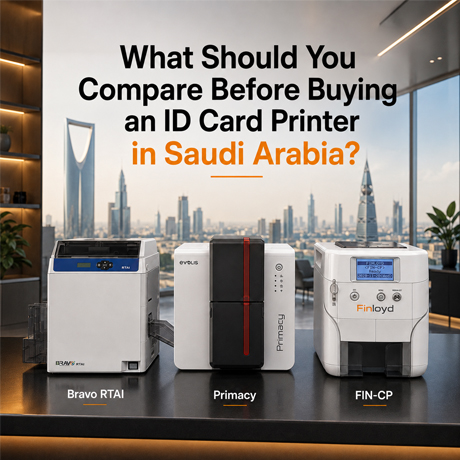
The right ID card printer in Saudi Arabia is the one that matches your card volume, security level, and encoding needs today — with enough headroom to grow for the next three to five years. Get those four factors right and everything else (price, brand, print method) falls into place.
This guide walks you through each decision so you buy once, correctly, instead of paying twice.
Finloyd (Alrawda Office Trading Co. Ltd) has been the No. 1 name in ID card printer sales and distribution in Saudi Arabia since 2008 — more than 17 years advising government, corporate, healthcare, education, and industrial clients across Riyadh, Jeddah, and Al Khobar. We’ve specified thousands of printers, so this guide reflects what actually matters when the machine has to perform in a real Saudi workplace.
The stakes are rising. The global ID card printer market was valued at roughly USD 1.73 billion in 2025 and is forecast to reach about USD 2.50 billion by 2032, with Saudi Arabia singled out as a growth hotspot — giga-project construction and national ID modernisation under Vision 2030 are pushing organisations toward secure, in-house credential issuance.
Start here: the five questions that decide your printer
Before comparing any brand or spec sheet, answer these. Your answers narrow the field faster than any brochure:
- How many cards will you print per month? This single number sets your printer class more than anything else.
- Single-sided or dual-sided? If your cards carry a photo on the front and compliance text, a QR code, or emergency info on the back, you need dual-sided.
- Do the cards need to open doors or clock attendance? If yes, you need on-board encoding (magnetic stripe, contact chip, or contactless RFID).
- How high is the security requirement? A visitor badge and a government credential are not the same purchase.
- Where will you be in three years? Buy for the volume and features you’ll grow into, not just today’s workload.
Factor 1: Match the printer to your card volume
Volume is the first filter because a printer built for the wrong throughput either wears out early or sits idle as overkill. Use these practical tiers:
| Monthly volume | Printer class | Recommended Finloyd printers | Who it suits |
|---|---|---|---|
| Up to ~300 cards | Entry / economy / on-demand | Finloyd FIN-CP, Evolis Zenius 2 | Small offices, clinics, schools, fitness clubs |
| ~300–1,500 cards | Mid-volume workhorse | Evolis Primacy 2, HID Fargo DTC1500 | HR departments, hospitals, mid-size corporates |
| 1,500+ cards | High-volume / central issuance | Evolis Quantum, HID Fargo HDP6600 | Universities, banks, large enterprises, bureaus |
| 30,000+ cards/year, top security | High-definition retransfer | Finloyd BRAVO RTAI, Evolis Agilia, HID Fargo HDP6600 | Government, high-security access, premium IDs |
A common and costly mistake is buying an entry-level desktop unit for a job that needs a workhorse — the print head wears out, cards queue up, and you replace the machine within a year. When in doubt, size up.
Factor 2: Print method and quality — direct-to-card vs retransfer
Two core technologies dominate, and the difference decides both your image quality and your per-card durability.
Direct-to-card (DTC)
The print head applies the ribbon directly onto the card at 300 dpi. It’s fast, cost-effective, and perfect for the vast majority of employee badges, membership cards, and access cards. Models like the Finloyd FIN-CP, Evolis Zenius 2, Evolis Primacy 2, and HID Fargo DTC1500 are DTC. A small unprinted border remains around the card edge on most DTC printers, though some (like the FIN-CP) achieve edge-to-edge coverage.
Retransfer (high-definition)
The image is printed in reverse onto a clear film, then fused onto the card — giving true over-the-edge printing at 600 dpi with the ink sealed under the film. Retransfer prints flawlessly on uneven surfaces like contactless smart cards, and it’s the standard for government IDs and high-security credentials. The Finloyd BRAVO RTAI, Evolis Agilia, and HID Fargo HDP6600 are retransfer printers. Expect a higher purchase and per-card cost in exchange for sharper output and greater durability.
Rule of thumb: choose DTC for everyday badging, retransfer when the card is a government credential, a high-security access card, or must look flawless edge-to-edge.
Finloyd printers head-to-head
To make it concrete, here’s how two Finloyd printers sit at the two ends of the range — the economy 300 dpi workhorse and the high-security 600 dpi retransfer machine — next to their closest Evolis equivalents:
| Spec | Finloyd FIN-CP (economy) | Evolis Zenius 2 | Finloyd BRAVO RTAI (high security) | Evolis Agilia |
|---|---|---|---|---|
| Print method | Direct-to-card (dye-sub + mono) | Direct-to-card | Retransfer, over-the-edge | Retransfer, over-the-edge |
| Resolution | 300 dpi | 300 dpi | 600 dpi | 600 dpi |
| Sides | Single (dual upgradable) | Single | Dual-sided | Single / dual |
| Speed | 180–200 colour/hr; 800 mono/hr | On-demand | 25s single / 55s double per card | Up to ~150 cards/hr |
| Feeder | 100 cards | 50 cards | 250 cards | 200 cards |
| Encoding options | Mag / smart / contactless (upgradable) | Mag / smart / contactless | SOC, RFID ribbon, feeder lock | Mag / smart / contactless |
| Security highlights | Edge-to-edge, colour + mono ribbons | Overlay, UV option | Holographic film, HOLO-MET™ metallic, tactile print | Microtext, guilloche, HD QR, lamination |
| Card materials | PVC, composite | PVC, composite | PVC, ABS, PET, PC, wooden, translucent | PVC, PET, ABS, PC |
| Warranty | 2 yrs (printer + printhead) | Manufacturer | 3 yrs, lifetime printhead | 3 yrs, lifetime printhead |
The takeaway: if you’re batch-issuing everyday badges on a budget, the Finloyd FIN-CP gives you 300 dpi edge-to-edge printing and up to 800 mono cards an hour at economy cost — and you can add dual-sided and encoding later as you grow. If you’re running a high-security, high-volume programme (30,000+ cards a year with holographic or metallic security), the Finloyd BRAVO RTAI delivers 600 dpi over-the-edge retransfer with HOLO-MET™ metallic security and even prints on wooden and translucent cards. Browse the full Finloyd ID card printer range to see every model.
Factor 3: Encoding — will your card do more than identify?
If the card also opens doors, records attendance, or stores data, it needs an encoder built into the printer. Specify this at purchase — retrofitting later is more expensive and sometimes impossible:
- Magnetic stripe — legacy access, loyalty, and payment-style cards.
- Contact chip — smart cards inserted into a reader.
- Contactless / RFID (MIFARE, DESFire) — tap-to-enter access control and cashless applications.
Most modern printers offer these as factory or field-upgradable modules, so you can print and encode in a single pass. The Finloyd FIN-CP, for example, is factory-upgradable for magnetic stripe (ISO 7811), contact smart (ISO 7816, EMV Level 1), and contactless/NFC (ISO 14443 A/B, MIFARE, DESFire). If access control is anywhere in your roadmap, buy encode-ready now.
Factor 4: Security features that separate a badge from a credential
Security should scale with how sensitive your facility or data is. The features to weigh:
- Protective overlay and lamination — resist abrasion, chemicals, and UV fading, which matters in the Saudi climate where cards otherwise fade within months.
- UV / fluorescent printing — a security mark invisible in normal light, only visible under UV.
- Custom watermark and microtext — the Fargo DTC1500, for example, prints a custom watermark for counterfeit resistance without a holographic overlay; retransfer models add microtext, guilloche, and HD QR.
- Holographic and metallic security — the Finloyd BRAVO RTAI adds holographic retransfer film and HOLO-MET™ metallic lustre ribbons plus inline tactile printing, giving overt, hard-to-copy security marks for national IDs and premium credentials.
- Holographic patches and tamper-evident laminates — visible, verifiable authenticity for government and high-security programmes.
- Data encryption and secure erase — enterprise units (e.g. AES-256 on the DTC1500) protect the data written to and stored on the card.
Factor 5: Total cost of ownership, not just the sticker price
The purchase price is a fraction of what an ID card programme actually costs. Compare printers on lifetime cost:
- Consumables (ribbons, film, cards) — the biggest ongoing cost. Retransfer film and lamination cost more per card than DTC ribbon. Some enterprise printers cut this materially — the HDP6600’s wasteless lamination reduces high-volume laminate cost by up to 40%.
- Genuine vs third-party supplies — inferior ribbons are a leading cause of fading, scratching, and premature print-head wear. Genuine consumables protect the head and the warranty.
- Print-head life and warranty — a professional printer, properly maintained, lasts around five to ten years; warranty terms differ meaningfully (the FIN-CP carries 2 years on printer and printhead, while the BRAVO RTAI carries 3 years with lifetime printhead cover).
- Maintenance and uptime — routine cleaning and preventive maintenance with local support keep a fleet running. Downtime on a badging line has a real operational cost.
- Local support and parts — a printer is only as reliable as the team behind it. In-country installation, training, spare parts, and troubleshooting are part of the true cost.
Which brand should you choose?
There’s no single “best” — the right brand depends on your use case:
- Finloyd’s own printers — the FIN-CP is the economy 300 dpi workhorse for everyday batch issuance (upgradable to dual-sided and encoding), while the BRAVO RTAI is our 600 dpi retransfer flagship for high-volume, high-security programmes with holographic and metallic HOLO-MET™ security.
- Evolis — the everyday all-rounder: excellent print quality and a model for every volume, from the Zenius 2 to the Quantum, plus the Agilia for high-security retransfer.
- HID Fargo — strong on security and enterprise features; the DTC1500 for secure mid-volume, the HDP6600 for high-speed 600 dpi retransfer at scale.
- Matica, Entrust, Zebra, Swiftcolor, Canon — each has a place in high-volume, financial, oversized-card, or specialist workflows.
Explore everything in one place in the Finloyd ID card printers catalogue, or see our guide on how to choose the right Evolis printer.
Why buy your ID card printer from Finloyd
Finloyd (Alrawda Office Trading Co. Ltd) has led ID card printer sales and distribution in Saudi Arabia since 2008. We don’t just ship hardware — we specify the right machine and stand behind it:
- Consultative selection — we size the printer to your real volume, encoding, and security needs, with room to grow.
- Genuine printers and consumables — protecting your print head, your cards, and your warranty.
- In-country support — installation, user training, preventive maintenance, and troubleshooting from a local team across Riyadh, Jeddah, and Al Khobar.
- Full ecosystem — printers, ribbons, cards, encoding, and access control that work together as one system.
Ready to choose the right ID card printer for your business? Talk to Finloyd for an expert recommendation and a quote matched to your volume and security needs.
Frequently asked questions
How do I choose the right ID card printer in Saudi Arabia?
Start with four factors: monthly card volume, single- vs dual-sided, whether cards need encoding for access control, and your security level. Match those to a printer class, then compare total cost of ownership — not just the purchase price.
How long does a professional ID card printer last?
With routine cleaning, preventive maintenance, and genuine consumables, a professional ID card printer typically lasts around five to ten years. Using inferior ribbons shortens print-head life significantly.
Which ID card printer is best for a small business or economy budget?
The Finloyd FIN-CP is an economy 300 dpi direct-to-card printer ideal for small offices, schools, clinics, and fitness clubs — edge-to-edge printing, up to 200 colour or 800 monochrome cards per hour, and a 2-year warranty, with dual-sided and encoding available as upgrades. The Evolis Zenius 2 is a strong alternative for on-demand issuance.
Which ID card printer is best for high-security, high-volume printing?
For 30,000+ cards a year with top security, the Finloyd BRAVO RTAI is a 600 dpi dual-sided retransfer printer with over-the-edge printing, holographic retransfer film, and HOLO-MET™ metallic security ribbons — it even prints on wooden and translucent cards. The Evolis Agilia and HID Fargo HDP6600 are comparable retransfer options.
What is the difference between dye-sublimation and retransfer printing?
Dye-sublimation (direct-to-card) prints the image straight onto the card at 300 dpi — fast and economical. Retransfer prints onto a film first, then fuses it to the card for edge-to-edge 600 dpi output and greater durability, at a higher per-card cost.
Can an ID card printer print RFID and access control cards?
Yes. With the right encoder fitted, most modern printers write magnetic-stripe, contact-chip, and contactless RFID data (such as MIFARE and DESFire) in the same cycle, producing a card that both identifies and grants access.
How important is print resolution?
Higher resolution (600 dpi retransfer vs 300 dpi DTC) gives sharper text, cleaner small logos, and better photos — important for high-security or premium credentials. For everyday badges, 300 dpi DTC is more than adequate. Balance resolution against volume and budget.
How can I reduce the running cost of an ID card printer?
Use genuine consumables, follow a routine cleaning and preventive-maintenance schedule, and right-size the printer to your volume. On high-volume laminating printers, wasteless lamination designs can cut laminate cost by up to 40%.
Should I buy single-sided or dual-sided?
Choose dual-sided if your cards carry information on both faces — a photo and details on the front, plus compliance text, a QR code, terms, or emergency information on the back. Single-sided suits simple visitor or basic ID cards. Some printers, like the Finloyd FIN-CP, start single-sided and upgrade to dual-sided later.
Where can I buy an ID card printer with support in Saudi Arabia?
Finloyd (Alrawda Office Trading Co. Ltd) is an authorised supplier serving Riyadh, Jeddah, and Al Khobar since 2008, with genuine printers and consumables, expert selection, and full local installation, training, and technical support. Contact us for a tailored recommendation and quote.