
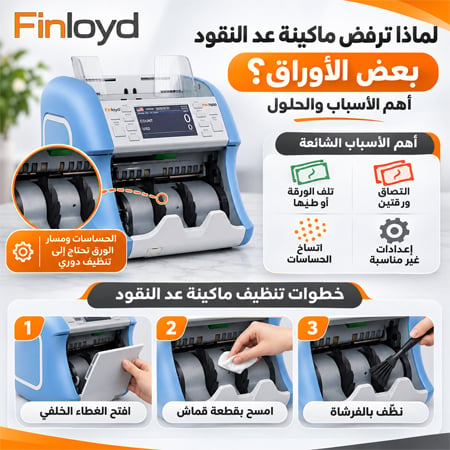
Quick answer: A money counter that rejects genuine notes is almost always dealing with one of four things: the note (folded, torn, taped, washed or very worn), the stack (notes stuck together or loaded crooked), dirty sensors (dust and paper fibre), or the wrong setting (currency or counting mode). Separate and straighten the notes, recount a small clean batch, then clean the sensors. If genuine notes keep being rejected after that, the machine needs a service or a software update. A rejected note is a note to check, not proof that it is fake.
First, find out whether it is the note or the machine
- Take out the rejected note and recount the rest of the batch.
- Run the rejected note alone, flat and straight.
- Count a small batch of clean, crisp notes you know are genuine.
If only that one note is rejected, the problem is the note. If clean notes are rejected too, the problem is the machine, its settings or its sensors.
Common reject types: what they mean and how to fix them
Every brand shows its own codes, so check your manual for the exact wording. The table below covers the reject types almost every counter uses.
| Reject or error | What the machine saw | Usual cause | Fix |
|---|---|---|---|
| Double note | Two notes passing as one | Notes stuck together, often from humidity or new crisp notes | Fan the stack, separate notes, recount |
| Chain (overlap) | Notes overlapping as they feed | Stack too tall or crooked, worn feed rollers | Load a smaller, squared stack; if it persists, service the feed |
| Half or short note | A note shorter than expected | Torn corner, folded edge, part of a note | Flatten or remove the note and count it by hand |
| Skew | A note entering at an angle | Stack not aligned with the side guides | Square the stack against the guides |
| UV | Wrong glow under ultraviolet light | Note washed with detergent, or a suspect note | Check by hand against SAMA’s security features |
| Magnetic (MG) | Magnetic ink missing or weak | Very worn note, dirty magnetic head, or a suspect note | Clean the sensors; check the note by hand |
| Infrared (IR) | Ink pattern wrong under infrared | Soiled or damaged note, dirty sensor | Clean the sensor window; recount |
| Image (CIS) | Note image not recognised | Dirty image sensor, wrong currency selected, very soiled note | Check currency setting; clean the sensor glass |
| Denomination | A different value in the stack | Mixed notes counted in a single-denomination mode | Switch to mixed (value) mode or sort first |
| Foreign or unknown note | A currency it was not set for | Dollar or euro note in a riyal batch | Remove the note or select the right currency |
Saudi conditions that cause rejects
- Humidity: in Jeddah and Al Khobar, damp notes cling together and trigger double-note errors. Fan the stack before loading, and keep the counter away from air-conditioning drips.
- Dust: dust storms in Riyadh and the Eastern Province coat sensors and rollers. Clean more often in dusty months.
- Worn small notes: 5 and 10 riyal notes pass through many hands and wear out first. Expect more rejects from them, and count very worn notes by hand.
- Washed notes: notes left in clothes and washed with detergent can glow under UV and fail the check even though they are genuine.
- New note series: when SAMA issues a new note design, older machines may reject it until the software is updated.
To check a rejected note by hand, use the security features of Saudi banknotes published by the Saudi Central Bank (SAMA).
A 5-step cleaning routine
- Switch off and unplug the machine.
- Empty the hopper, stacker and reject pocket.
- Brush out dust from the feed path with the brush supplied or a soft dry brush.
- Wipe the sensor windows gently with a soft, dry, lint-free cloth. Never spray liquid or use solvents inside the machine.
- Test with a small batch of clean, genuine notes before returning to work.
On a busy counter, brush daily and wipe the sensors weekly; in dusty months, do both more often.
When to stop troubleshooting and call service
- Clean, genuine notes are still rejected after cleaning and checking the settings.
- The count is wrong when you check it by hand.
- The machine makes grinding or clicking sounds, or notes jam repeatedly.
- The same error appears on every batch.
- A new note series has been issued and the machine rejects it.
Do not open the machine or change sensor sensitivity yourself; wrong settings can let fakes through or reject good notes.
Fewer rejects, fewer stops
Some rejects cannot be avoided: worn and suspect notes will always need a hand check. What you can change is whether each one stops the count. On a basic counter, every suspect note halts the batch. A 1+1 machine such as the Kisan K2 sends it to a reject pocket and keeps counting, so you check all the rejects together at the end. For high volumes, see our guide to professional money counting machines.
Service and updates in Saudi Arabia
Finloyd has supplied and serviced money counting machines in Saudi Arabia since 2008 and is the authorized distributor of Kisan counters in the Kingdom. Our technicians in Riyadh, Jeddah and Al Khobar clean and calibrate machines, update software for new notes, and provide door-to-door maintenance. See all money counting machines.
Frequently asked questions
Why does my money counter reject genuine notes?
Usually because the notes are stuck together, folded, torn, washed or very worn, the stack is loaded crooked, the sensors are dirty, or the wrong currency or mode is selected. Separate the notes, clean the sensors and recount a small batch.
Does a rejected note mean it is fake?
No. A reject means “check this note”. Many rejects are worn, damaged or washed genuine notes. Check it by hand against SAMA’s published security features.
What does a double note error mean?
The machine saw two notes passing as one. Fan the stack to separate stuck notes, which is common in humid weather, and recount.
Why does my money counter give a UV error on genuine notes?
Notes washed with detergent can glow under ultraviolet light and fail the check. A dirty UV sensor can also cause it. Clean the sensor and check the note by hand.
How often should I clean a money counting machine?
Brush out dust daily on a busy counter and wipe the sensor windows weekly with a dry, lint-free cloth. Clean more often in dusty months. Never use liquids or solvents inside.
Why does my counter reject the new riyal notes?
Its software may not recognise a new note design yet. A technician can update it.
Why is my money counter count wrong?
Stuck or overlapping notes and worn feed rollers are the usual causes. Fan the stack and load fewer notes; if counts are still wrong, the feed needs servicing.
Who repairs money counting machines in Saudi Arabia?
Finloyd services money counting machines in Riyadh, Jeddah and Al Khobar, including cleaning, calibration and software updates. Call Jeddah +966 50 844 0075, Riyadh +966 50 003 2928 or Al Khobar +966 55 721 2191.
Machine still rejecting good notes? Call us with the model and the error shown on the screen, and our technicians will fix it on site.